Strip attachments
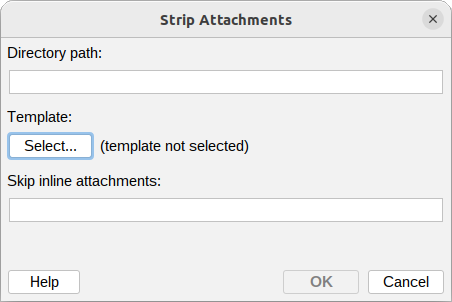
This action removes attachments from an email message, saves them to a folder on the mail server, and inserts a template into the message body in their place. It is useful for offloading large or sensitive files while leaving the recipient a note - for example a link to where the files were stored, or a short explanation that the attachments were removed.
Signed and encrypted messages are left untouched, because removing their parts would break the signature or the encryption.
Directory path
The path must be located on the mail server and must have write permissions for the msh user.
Path where the removed attachments should be saved.
Example:
/var/mail/stripped/{message:id}
Variables can be used in the Directory path field.
Template
The template inserted into the message body in place of the removed attachments. Use it to explain to the recipient that the attachments were stripped and, if needed, where to find them.
Skip inline attachments
A semicolon-separated list of content type patterns. Inline attachments whose content type matches
any pattern are kept in the message instead of being stripped. The * character can be used as a
wildcard.
Example:
image/*;text/calendar
This keeps inline images and calendar invites - which are often part of how a message is displayed - while still stripping regular file attachments. Leave the field empty to strip every attachment.
Additional resources
- How to use Variables
- Common Content type patterns for the Skip inline attachments field