Forward message
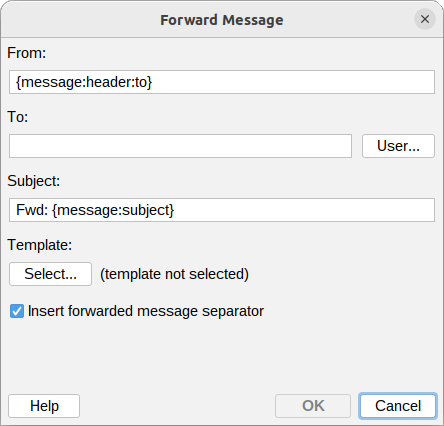
The Forward message action forwards the message that triggered the rule to another recipient. The chosen template is placed above the original message body, so you can add a note explaining why the message was forwarded. Both the Html and the plain-text versions of the message are sent as alternatives, so the recipient's mail client can pick the format it prefers, and the original attachments are kept.
From
The sender address used for the forwarded message. A single address. For a new action it defaults
to {message:header:to}, so the forward is sent from the original recipient; change it if needed.
To
The recipient the message is forwarded to. Type one or more addresses manually, separating several with a comma or semicolon, or click User... to pick them from the directory (the picked address is added to the field).
Subject
The subject of the forwarded message. For a new action it defaults to Fwd: {message:subject}.
Template
Click Select... to choose the template placed above the original message body. Both the Html and the plain-text content of the template are used, matching the two alternatives of the forwarded message.
Insert forwarded message separator
When enabled (the default), a familiar mail-client forward header is placed between the template and the original body, showing the original message's sender, date, subject and recipient:
---------- Forwarded message ---------
From: John Smith <john.smith@example.com>
Date: Tue, Jul 14, 2026 at 1:48 PM
Subject: Original subject
To: recipient@example.com
Uncheck it to place the template directly above the original body without the header.
Variables can be used in the From, To and Subject fields, so they can be derived
from the message being processed - for example {message:header:from}.
Additional resources
- How to use Variables