Message counting based on sender
Available only as a condition.
The message count is exact only when a single mail server handles the mail flow. Each server keeps its own count and does not share it with other servers, so if mail flows to more than one server, each of them counts messages separately.
For example, if 30 messages from one sender are spread evenly across 3 servers within the time interval, each server counts only about 10, so a Greater or equal condition with a count of 20 does not match on any of them.
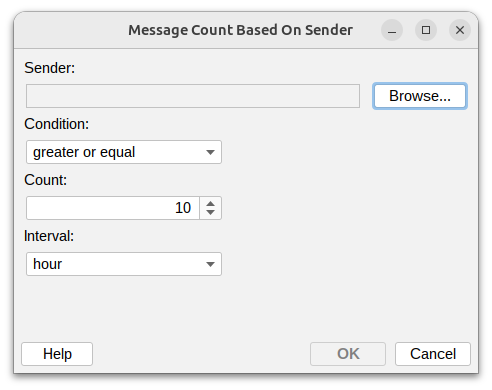
This condition lets you monitor and control how many messages a sender can send within a specific time period. This is useful for implementing sending quotas, detecting spam patterns, or identifying unusual activity.
Sender
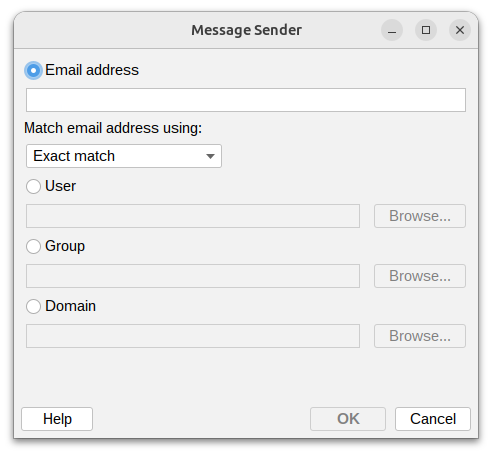
Read more about Sender field. All the ways of matching are available here as well, including In Group for counting the messages of every member of a group and In Domain for a whole domain.
Condition

Set how to compare the message count:
- Greater or equal – At least the specified number of messages
- Greater than – More messages than the specified count
- Less or equal – No more than the specified number of messages
- Less than – Fewer messages than the specified count
- Equal – Exactly matches the count you specify
- Not equal – Any count except the one you specify
Count
Enter the number of messages to use as the threshold.
Time interval

Choose the time period to count messages within:
- Minute – Messages per minute
- Hour – Messages per hour
- Day – Messages per day (24 hours)
- Week – Messages per week (7 days)
- Month – Messages per month (30 days)