Run executable
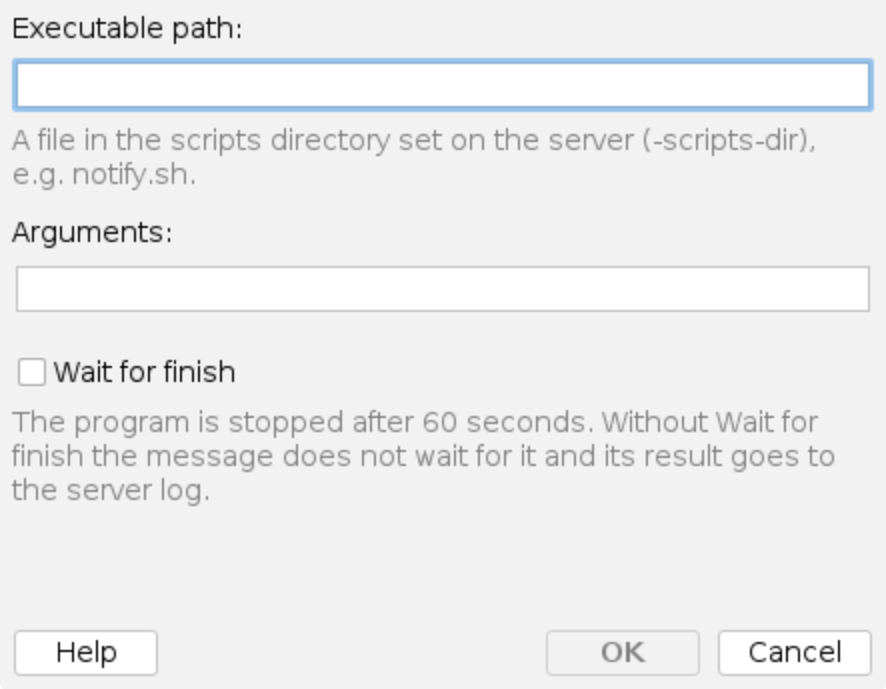
The Run executable action runs a program from the scripts directory of the milter server when a policy rule matches: a notification, a ticket, an entry in another system. You can pass message details to the program as arguments and choose whether the message waits for the program to finish.
The program must now be a file in the scripts directory, /opt/msh-pm-milter/scripts by default.
A rule whose executable lies outside it, such as /usr/local/bin/notify, stops running after the
update, with the reason in the processing trace and the server log. Move the program, or a wrapper
script that calls it, into the scripts directory, run lib/fixperms.sh, and put its name in the
rule, for example notify.sh.
The action follows the same rules as the External script condition:
- The program must be a file in the scripts directory,
SCRIPTS_DIRin the server's configuration, which the launcher passes to the milter as-scripts-dir. It is refused when it lies outside the directory, also through..or a symbolic link, is not a regular executable file, or can be written by its group or other users. With external scripts disabled, an emptySCRIPTS_DIR, the action runs nothing. - It runs without a shell, in the scripts directory, as the milter's user, with a cleaned
environment plus the
MSH_*variables of the message, the same as for the condition, see Environment variables. - At most
SCRIPTS_MAX_CONCURRENTprograms and scripts run at the same time. - It is stopped after 60 seconds, together with any process it started.
Executable path
The file to run, relative to the scripts directory.
Example:
notify.sh
Arguments
The arguments passed to the program, separated by spaces.
Example:
--subject={message:subject} --from={message:envelope:sender}
Variables can be used in the Arguments field, so message details are resolved for each message
before the program is run. A variable that resolves to a value containing spaces is passed as a
single argument, so joining it to a flag with = (for example --subject={message:subject}) keeps
the flag and its value together. The values come from the sender, so treat them as untrusted: see
Values from the message are not to be trusted.
Wait for finish
When enabled, the message waits for the program to finish, at most 60 seconds, and the processing trace shows its exit code, duration and output.
When disabled, the program is started and the message goes on at once. The program still runs under the same rules, and its exit code and output go to the server log instead of the trace. Leave the option disabled for programs that take time, so they do not hold up mail.
Processing trace
The processing trace in the Events history shows what ran, for example:
Running notify.sh (at most 60 s).
The program finished with exit code 0 in 212 ms.
Output: ticket 4711 created
Starting notify.sh without waiting for it (at most 60 s, result in the server log).
The program was not run: '/usr/local/bin/notify' is outside the scripts directory /opt/msh-pm-milter/scripts.
What the program writes to standard error is shown as Error output:, and a program stopped by
the timeout is reported as The program timed out and was stopped after 60012 ms.. A program
that was not run is also reported in the server log.
Only files an administrator placed in the scripts directory can be run, so an account that can edit rules cannot run arbitrary programs on the mail server.
Additional resources
- External script - the scripts directory, how to add a program to it, and the environment variables
- Internal configuration -
SCRIPTS_DIRandSCRIPTS_MAX_CONCURRENT - How to use Variables