You want every message that leaves your company to carry the same footer: the sender's name, a phone number, a logo, maybe a line of legal text. On a Postfix server the obvious question is where that setting lives. The short answer: Postfix cannot add a signature to outgoing email by itself. It routes and delivers messages, but it never edits a message body. You need a program in the mail path that rewrites each outgoing message, and you have to hook it into Postfix so it sees outgoing mail and nothing else.
This guide covers both ways to do that. First, a complete manual setup using a content_filter and alterMIME, scoped properly to outgoing mail. Then the milter approach with MSH Postfix Milter, which adds HTML, per-user details, and correct handling of replies and DKIM.
Quick answer
To add a signature to outgoing email in Postfix:
- Choose a tool that can edit message bodies: a
content_filterscript that runsalterMIME, or a milter. - Attach it only where outgoing mail enters Postfix. For a content filter, that means the
submission(587) andsmtps(465) services inmaster.cf, notsmtpon port 25. For a milter, a condition on message direction. - Add the signature before the message is DKIM-signed, then send a test message to an external mailbox and check the footer and the DKIM result.
Neither header_checks nor body_checks can do this. They can reject, discard, or rewrite individual header lines, but they cannot append text to a message body.
What "outgoing only" means to Postfix
Postfix has no setting called "outgoing". It has entry points, and each one carries a different mix of mail:
| Entry point | Carries | Signature? |
|---|---|---|
smtp on port 25 | Inbound mail from the internet, and on many servers relayed mail from trusted hosts | No - this is how customers end up receiving their own mail back with your footer |
submission on 587, smtps on 465 | Authenticated users sending from Outlook, Thunderbird, phones, and most webmail | Yes - the main outgoing path |
pickup via /usr/sbin/sendmail | Mail from local applications, scripts, cron, and some webmail installs | Sometimes - and the classic filter setup cannot reach it safely |
Most copy-and-paste tutorials attach the filter to smtp on port 25, which signs inbound mail too, and then patch the problem with a grep against a list of local sender addresses. Attaching to the submission services instead is cleaner: only authenticated users send there, so the mail is yours by definition.
One caveat stays either way. A message from one colleague to another is submitted on port 587 just like a message to a customer, so a submission-level filter signs internal mail as well. Telling the two apart means looking at the recipient domains, which the shell approach can only do with more script.
Method 1: content_filter and alterMIME
This is the free, do-it-yourself route. Postfix hands each outgoing message to a shell script, the script runs alterMIME to append the signature, and then re-injects the result with sendmail. The commands below are for Debian and Ubuntu. On RHEL-based systems, alterMIME comes from EPEL.
1. Install alterMIME and create the filter user
sudo apt install altermime
sudo useradd -r -c "Postfix signature filter" -d /var/spool/filter -s /usr/sbin/nologin filter
sudo mkdir /var/spool/filter
sudo chown filter:filter /var/spool/filter
sudo chmod 750 /var/spool/filter
2. Write the signature files
alterMIME takes a plain-text version and, optionally, an HTML version. Keep them in sync by hand, because nothing else will.
--
Example Ltd | +44 20 7946 0000 | www.example.com
<p style="font-family:Arial,sans-serif;font-size:12px;color:#555">
  --<br>
  <strong>Example Ltd</strong> | +44 20 7946 0000 |
  <a href="https://www.example.com">www.example.com</a>
</p>
3. Create the filter script
#!/bin/sh
# Appends the company signature and hands the message back to Postfix.
INSPECT_DIR=/var/spool/filter
SENDMAIL="/usr/sbin/sendmail -G -i"

# Exit codes from <sysexits.h>
EX_TEMPFAIL=75
EX_UNAVAILABLE=69

trap "rm -f in.$$" 0 1 2 3 15

cd $INSPECT_DIR || { echo "$INSPECT_DIR does not exist"; exit $EX_TEMPFAIL; }
cat > in.$$ || { echo "Cannot save mail to file"; exit $EX_TEMPFAIL; }

/usr/bin/altermime --input=in.$$ \
    --disclaimer=/etc/postfix/signature.txt \
    --disclaimer-html=/etc/postfix/signature.html \
    || { echo "Message content rejected"; exit $EX_UNAVAILABLE; }

$SENDMAIL "$@" < in.$$
exit $?
sudo chown root:filter /etc/postfix/add-signature
sudo chmod 750 /etc/postfix/add-signature
Exit code 75 tells Postfix to keep the message and retry later, so a broken filter delays mail instead of losing it. Watch the queue after any change.
4. Attach the filter to outgoing mail only
Add a content_filter override to the submission services and define the pipe service that runs the script. Leave the smtp line on port 25 alone.
submission inet n       -       y       -       -       smtpd
  -o syslog_name=postfix/submission
  -o smtpd_tls_security_level=encrypt
  -o smtpd_sasl_auth_enable=yes
  -o smtpd_client_restrictions=permit_sasl_authenticated,reject
  -o content_filter=signature:

smtps     inet  n       -       y       -       -       smtpd
  -o syslog_name=postfix/smtps
  -o smtpd_tls_wrappermode=yes
  -o smtpd_sasl_auth_enable=yes
  -o smtpd_client_restrictions=permit_sasl_authenticated,reject
  -o content_filter=signature:

signature unix  -       n       n       -       10      pipe
  flags=Rq user=filter null_sender=
  argv=/etc/postfix/add-signature -f ${sender} -- ${recipient}
Merge the content_filter line into your existing submission entries rather than replacing them, since your TLS and SASL options may differ. Then reload:
sudo postfix check
sudo systemctl reload postfix
5. Test it
Send an authenticated message on port 587 to a mailbox outside your domain, for example with swaks, and follow the log:
swaks --server mail.example.com:587 --tls --auth LOGIN \
      --auth-user you@example.com --from you@example.com \
      --to someone@gmail.com --header "Subject: signature test"

sudo tail -f /var/log/mail.log    # or: journalctl -u postfix -f
You should see the message delivered to relay=signature, then a second queue ID as it is re-injected and sent out. Then send a message to your server from an outside address and confirm that it arrives without the footer.
Where this setup stops
- Mail from
sendmailis not covered. You cannot just add-o content_filter=signature:topickup: the script re-injects throughsendmail, which goes throughpickupagain, and the message loops. - Everyone gets the same footer. The signature file is static. Names and job titles mean one file per employee, generated by another script.
- HTML is unreliable. alterMIME appends to the parts it finds. A plain-text message has no HTML part, and turning it into a proper
multipart/alternativemessage is not what alterMIME does. - Replies pile up. The footer is appended at the very end of every message, below the quoted thread, and again on every reply.
- DKIM can break. Explained below.
For a plain-text company footer on a single domain, the setup above is all you need. Once the request becomes "HTML with our logo and each person's details", it turns into a small mail-rewriting application written in shell. That is the point where a milter makes more sense. There is more on this in alterMIME alternatives.
Method 2: a milter with MSH Postfix Milter
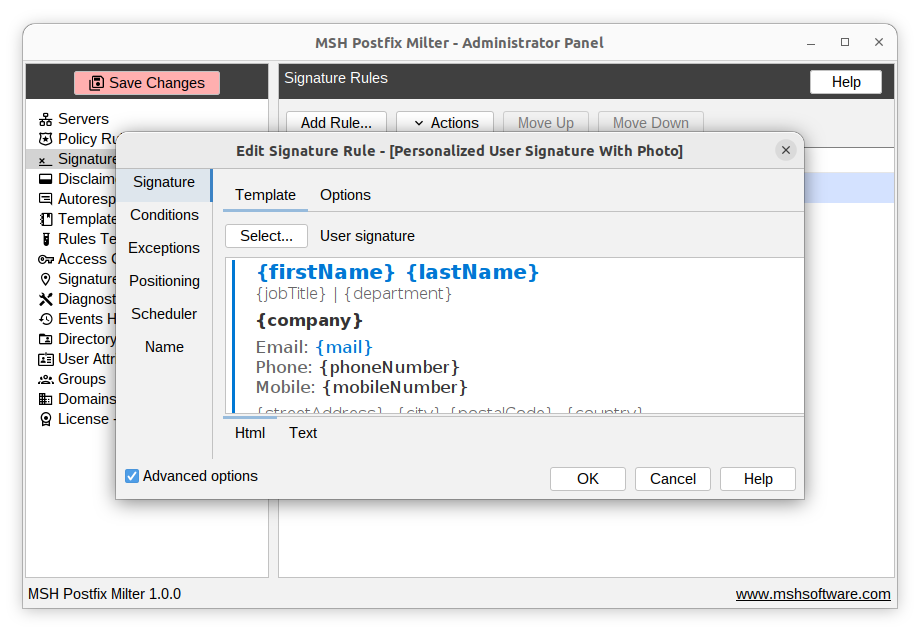
A milter plugs into Postfix during the SMTP conversation instead of after it. There is no pipe service, no filter user, no spool directory, and no re-injection. MSH Postfix Milter works this way and applies signatures from rules you manage in a web Administrator Panel.
1. Register the milter with Postfix
Install the server module and the Administrator Panel (see the quick start guide), then point Postfix at it. Registering in non_smtpd_milters as well covers mail submitted through sendmail, which the content filter above could not reach.
sudo postconf -e smtpd_milters=inet:localhost:7080
sudo postconf -e non_smtpd_milters=inet:localhost:7080
sudo postconf -e milter_default_action=accept
sudo systemctl reload postfix
milter_default_action=accept means mail keeps flowing even if the milter is stopped. It just goes out without a signature until the milter is back.
2. Tell it which domains are yours
On the Domains page, list the domains your server handles. The milter uses that list to classify every message as incoming, internal, or outgoing. This is the answer to "outgoing only" that the submission-port approach could not give: a colleague-to-colleague message is internal, so it is not signed. A message with both internal and external recipients counts as outgoing.
3. Design the signature
Build a template in the visual designer or import your existing HTML and TXT files. If you connect a directory service (Active Directory, OpenLDAP, or a CSV import), the template can use placeholders that are filled with the sender's details for each message:
<p style="font-family:Arial,sans-serif;font-size:12px">
  <strong>{displayName}</strong>{#if jobTitle} | {jobTitle}{/if}<br>
  {company}<br>
  {#if phoneNumber}T: {phoneNumber}{/if}{#if mobileNumber} | M: {mobileNumber}{/if}
</p>
<img src="logo.png" alt="Example Ltd" width="120">
The {#if} blocks hide a line when the attribute is empty, so nobody sends out a stray "M:" with no number. Images referenced in the template can be attached as inline CID images (they display without loading anything remotely), embedded as Base64, or left as external URLs.
4. Create an outgoing signature rule
Create a signature rule, select the template, and add the Message direction condition set to Outgoing. Add exceptions for anything that should go out unsigned, such as a noreply@ sender or a specific group. If different teams need different footers, create one rule per group.
By default the signature is placed under the reply text, not at the very bottom of the quoted thread, so it sits where a signature from Outlook would. The milter recognises reply separators from different clients and locales, and you can add your own. If you prefer, users can type a marker such as -- SIGNATURE -- to choose the spot themselves.
5. Test, then enable
The rules tester simulates a message and shows which rules match, without sending anything. Try an outgoing message, an internal one, an inbound one, and a reply, then enable the rule. From then on, changing the signature is a template edit in the panel, with no master.cf changes and no reload.
Keeping DKIM valid when you add a signature
A DKIM signature includes a hash of the message body. If anything changes the body after the message is signed, the receiving server calculates a different hash and the DKIM check fails. A footer added after signing breaks DKIM every time, and with a DMARC policy of quarantine or reject your mail lands in spam or bounces.
With a content filter, the risk comes from OpenDKIM running as a milter on the submission service. It signs the message when it is received, and the content filter appends the footer later, at queue time. Make sure signing happens on the re-injected message, not on the one the user submitted.
With milters, Postfix runs them in the order listed. Put the signature milter first and OpenDKIM after it, so the footer is already there when the body hash is calculated:
smtpd_milters     = inet:localhost:7080, inet:localhost:8891
non_smtpd_milters = inet:localhost:7080, inet:localhost:8891
Port 8891 is the usual OpenDKIM default. Use whatever your opendkim.conf or Rspamd setup listens on. To verify, send a message to a Gmail address, open Show original, and check that it says DKIM: PASS.
Troubleshooting: signature not added
Missing on some outgoing messages
Check which service accepted the message. The syslog_name in the log line (postfix/submission, postfix/smtps, postfix/pickup) tells you which path it took. A content filter only applies to the services it is attached to. Mail from webmail or applications often arrives through pickup or through port 25 from localhost.
Added to incoming mail too
The filter is on the smtp service, or content_filter is set globally in main.cf. Remove it there and attach it to the submission services only.
HTML signature missing or shown as raw code
The message was plain text, so alterMIME had no HTML part to append to and used the text version. Or the client sent HTML in an encoding alterMIME would not modify. A milter that converts between message and template encodings avoids both cases.
Signature repeated down the thread
Every reply appends another copy at the bottom. Put the signature under the reply text instead, or apply it to new messages only with a message type condition.
Mail stuck in the queue after enabling the filter
Run mailq and read the deferral reason. Usually it is the script's permissions, a missing /var/spool/filter, or the filter user being unable to read the signature files. The script exits with code 75, so Postfix keeps retrying until you fix it.
content_filter vs milter at a glance
| Requirement | content_filter + alterMIME | MSH Postfix Milter |
|---|---|---|
| Outgoing mail only | By service in master.cf, internal mail included | Message direction condition, internal mail excluded |
Mail submitted through sendmail | Not covered without extra plumbing | Covered by non_smtpd_milters |
| HTML signature with a text version | Two files, fragile on plain-text mail | One template, both versions |
| Logo images | External URL only | Inline CID, Base64, or external URL |
| Each sender's name and title | One generated file per user | Placeholders from AD, OpenLDAP, or CSV |
| Signature placed under the reply | No - always at the end | Yes, or at a fixed marker |
| Works with DKIM | Needs care around re-injection | List it before OpenDKIM |
| Change the signature | Edit files on the server | Edit the template in the panel |
| Test before going live | Send real mail and read logs | Rules tester |
| Cost | Free | Commercial, with a free trial |
Frequently asked questions
Can Postfix add a signature to outgoing email by itself?
No. Postfix routes and delivers mail but never edits message bodies, and header_checks and body_checks cannot append text. A signature is added by an external program attached to Postfix - either a content_filter script that runs alterMIME, or a milter such as MSH Postfix Milter.
How do I add the signature only to outgoing mail and not to incoming mail?
With a content filter, attach it only to the submission (587) and smtps (465) services in master.cf, never to the smtp service on port 25, which receives inbound mail. With MSH Postfix Milter, add a Message direction condition set to Outgoing, which classifies mail using the domains your server handles.
Is an email signature the same as a DKIM signature?
No. An email signature is the visible footer with a name, title, and contact details. A DKIM signature is an invisible cryptographic header added by OpenDKIM or Rspamd to prove the message was not altered. You often need both, and the footer must be added before the DKIM signature is calculated.
Why is my Postfix signature not added to some outgoing messages?
The content filter is usually attached to only one smtpd service. Mail submitted on another port, or by applications and webmail through /usr/sbin/sendmail, enters Postfix through the pickup service and skips the filter. A milter registered in both smtpd_milters and non_smtpd_milters sees all of those paths.
Will adding a signature break DKIM?
Only if the message is signed before the signature is added. DKIM covers the body, so any change after signing fails verification. With milters, list the signature milter before OpenDKIM in smtpd_milters so the footer is added first and the final body is what gets signed.
Can the signature include each sender's name and job title?
Not with alterMIME, which appends the same static file to every message. MSH Postfix Milter looks up the sender in Active Directory, OpenLDAP, or an imported CSV and fills placeholders such as {displayName}, {jobTitle}, and {phoneNumber} for each message.
Can I add an HTML signature with a logo in Postfix?
Yes. MSH Postfix Milter applies HTML signature templates with a matching plain-text version, and images in the template can be attached as inline CID images, embedded as Base64, or left as external URLs.
Add your signature to outgoing mail today
Install the milter next to your current setup, build the signature as a template, and check it in the rules tester before Postfix sends a single signed message.
Related reading: per-user signatures from your directory, company-wide branded signatures, disclaimers on outgoing mail, and pricing.