If you manage a Postfix mail server, you have probably been asked to give every employee the same professional email signature - their name, job title, phone number, and the company logo - applied automatically to every message they send. The challenge is that Postfix has no built-in support for user signatures. Out of the box it routes and delivers mail; it does not edit message bodies, and it has no idea who your users are or what their job titles are.
This page explains how Postfix user signatures actually work, shows the traditional manual approach and where it falls short, and then shows the easy way to apply per-user, server-side signatures with MSH Postfix Milter.
Server-side vs client-side signatures
A client-side signature is configured inside each person's mail client - Outlook, Thunderbird, Apple Mail, or a webmail interface. It is quick for one person but impossible to control at scale: users change the font, delete the disclaimer, forget to set it on their phone, or copy an old version with last year's job title.
A server-side signature is applied centrally on the Postfix server as the message leaves your organisation. Every message gets the correct, approved signature regardless of which device or client sent it. This is the only reliable way to guarantee brand consistency and legal compliance across an entire company.
The manual way: Postfix and alterMIME
The traditional do-it-yourself approach uses a Postfix content filter together with a tool such as alterMIME. You add a filter to master.cfthat pipes outgoing mail through a script which appends a signature file:
smtp      inet  n       -       y       -       -       smtpd
  -o content_filter=dfilt:

dfilt     unix  -       n       n       -       -       pipe
  flags=Rq user=filter argv=/etc/postfix/disclaimer -f ${sender} -- ${recipient}
The /etc/postfix/disclaimer script then runs alterMIMEagainst a static signature file:
/usr/bin/altermime --input=in.$$ \
  --disclaimer=/etc/postfix/signature.txt \
  --disclaimer-html=/etc/postfix/signature.html
This works, but it has real limits that show up quickly in production:
- One signature for everyone. The signature file is static, so personalising it per user means maintaining a separate file and a separate rule for every employee.
- No directory data. alterMIME does not know your users' names, titles, or phone numbers - you hand-type them into files.
- Fragile HTML handling. Appending HTML safely across all the MIME shapes real mail takes (multipart, alternative, inline images) is notoriously error-prone.
- Hard to maintain. Every new hire, job change, or rebrand means editing files and reloading Postfix.
- Duplicate signatures on replies. Without detection logic, long threads collect a stack of repeated signatures.
The easy way: per-user signatures with MSH Postfix Milter
MSH Postfix Milter connects to Postfix as a milter and applies signatures from a central Administrator Panel. Instead of one static file per user, you design a single HTML template with placeholders, and the milter merges each user's directory attributes into it automatically.
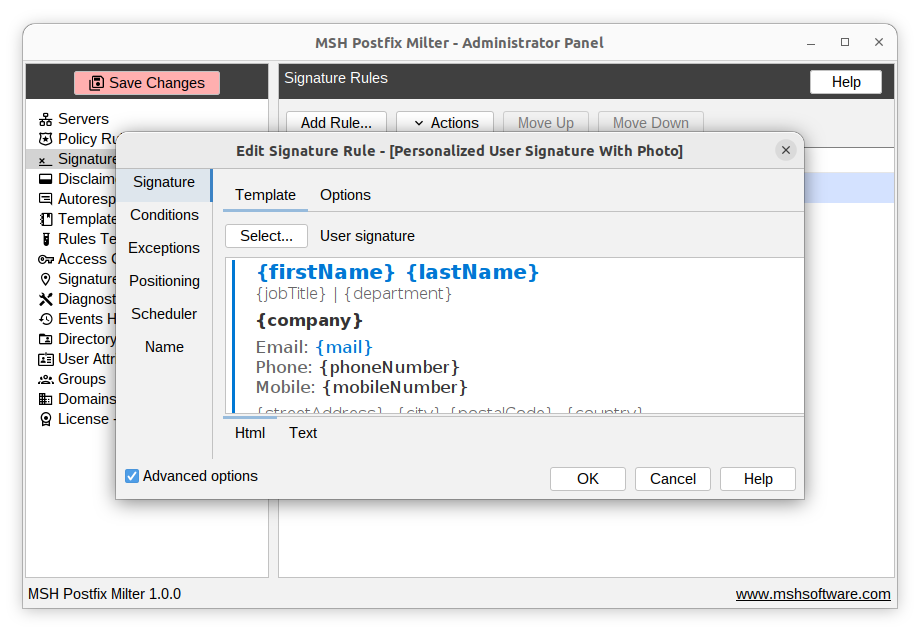
Set it up in four steps
- Install the milter and connect it to Postfix with
smtpd_milters(the installer walks you through it). - Connect your directory so the panel can read each user's name, title, department, and phone number.
- Design one signature template in HTML and Text using attribute placeholders
- Create a signature rule targeting the right users or domains, and verify it with the built-in rules tester before going live.
Because the signature is driven by directory data, a new hire is automatically covered the moment their account exists, and a company-wide rebrand is a single edit to one template. Duplicate-signature detection keeps long email threads clean.
Frequently asked questions
Does Postfix support per-user signatures natively?
No. Postfix has no native concept of a user signature. Server-side signatures are added by a content filter or milter that rewrites each message as it passes through the mail server. MSH Postfix Milter is such a milter, with per-user signatures driven by directory data.
What is the difference between server-side and client-side signatures?
Client-side signatures are configured in each user's mail client and are easy for users to change or remove. Server-side signatures are applied centrally on the Postfix server, so every message leaves with a consistent, approved signature regardless of the device or client used.
Can each employee have a different signature with their own name and title?
Yes. MSH Postfix Milter reads user attributes such as name, job title, phone, and department from your directory and merges them into a shared HTML template, so every user gets a personalised signature without editing files by hand.
Do server-side signatures support HTML and images?
Yes. MSH Postfix Milter applies full HTML signatures with logos and links, and adds a plain-text alternative automatically. The classic alterMIME approach only appends plain text.