A consistent email signature is part of your brand. When every employee sends mail with the same logo, contact block, and legal footer, your company looks professional and stays compliant. The problem: Postfix does not add email signatures by itself. It is a mail transfer agent - it moves messages, but it never edits their content.
To add a centrally managed signature to outgoing mail you need a milter or content filter sitting in the mail path. This page covers the manual approach and its drawbacks, then shows how MSH Postfix Milter manages company-wide HTML signatures from a single panel.
The manual way and why it gets painful
The common DIY route is a Postfix content filter that pipes mail throughalterMIME, appending a signature file to each message. A minimalmaster.cf filter looks like this:
smtp      inet  n       -       y       -       -       smtpd
  -o content_filter=dfilt:

dfilt     unix  -       n       n       -       -       pipe
  flags=Rq user=filter argv=/etc/postfix/disclaimer -f ${sender} -- ${recipient}
It runs, but it struggles with the realities of branded mail:
- HTML is hard. Inserting an HTML signature cleanly into multipart and alternative MIME structures, with inline images, is fiddly and breaks easily.
- Static content. The signature file is the same for everyone and has to be edited by hand for any change.
- No per-department control. Different signatures for sales, support, or a second brand means more scripts and more rules.
- Duplicates on threads. Without detection, replies accumulate repeated signatures.
- Reload churn. Every edit means touching server files and reloading Postfix.
Centralised signatures with MSH Postfix Milter
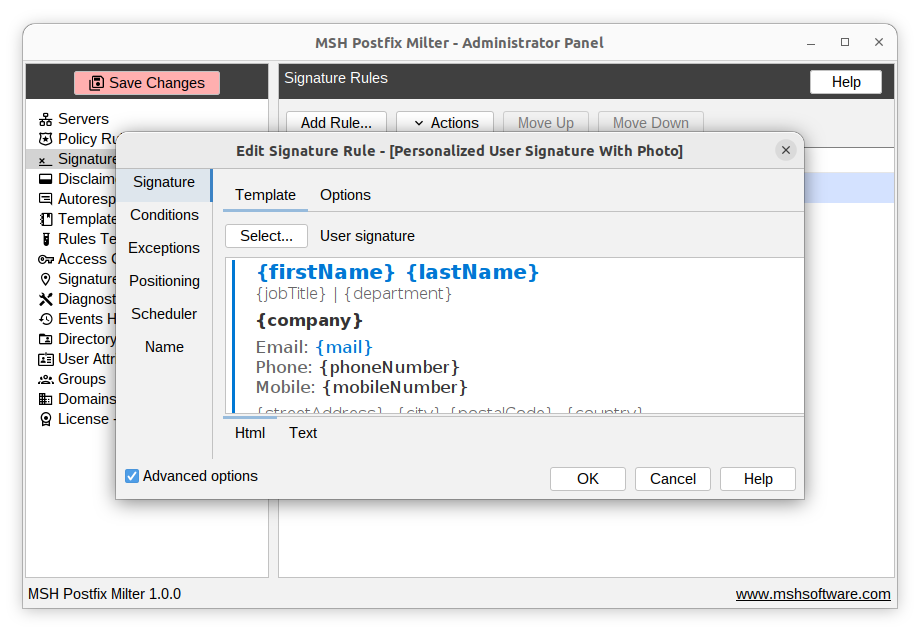
MSH Postfix Milter manages signatures from a web Administrator Panel. You design a branded HTML signature once, scope it with a rule, and the milter applies it to every matching message - with a plain-text alternative generated automatically and duplicate detection built in.
Set it up in four steps
- Install the milter and connect it to Postfix with
smtpd_milters. - Design the signature as a branded HTML template in the panel.
- Target the senders - apply company-wide, or scope rules per domain, group, or user.
- Test and deploy using the rules tester, then turn the rule on for live mail.
Need different footers per team? Create one rule per group. Need a per-person signature with each user's own name and title?
Frequently asked questions
How do I add a company-wide email signature in Postfix?
Postfix itself cannot edit message bodies, so a company-wide signature is added by a milter or content filter. MSH Postfix Milter applies a centrally managed HTML signature to every outgoing message, so all staff send mail with the same branded footer.
Can I use HTML and a logo in a Postfix email signature?
Yes. MSH Postfix Milter applies full HTML signatures including logos, links, and social icons, and automatically maintains a plain-text alternative for non-HTML clients.
Can different departments have different signatures?
Yes. Signature rules can target specific domains, groups, or users, so the sales team, support team, and executives can each have their own branded signature.