Many organisations are required to add a legal disclaimer to their email - confidentiality notices, regulatory statements, or GDPR-related text. The catch is that Postfix has no built-in disclaimer feature. As a mail transfer agent it routes mail; it never edits the body of a message.
To configure a disclaimer in Postfix you add a component to the mail path that rewrites messages. Below is the traditional alterMIME method and its limits, then the simpler, rule-based way with MSH Postfix Milter.
The manual way: Postfix and alterMIME
The classic approach pipes mail through a content filter that callsalterMIME. You define the filter in master.cf:
smtp      inet  n       -       y       -       -       smtpd
  -o content_filter=dfilt:

dfilt     unix  -       n       n       -       -       pipe
  flags=Rq user=filter argv=/etc/postfix/disclaimer -f ${sender} -- ${recipient}
The script then runs alterMIME against a disclaimer file, and you typically keep a list of which sender addresses should get the disclaimer:
# only disclaim mail from addresses listed here
if grep -qi "^${from_address}\$" /etc/postfix/disclaimer_addresses; then
  /usr/bin/altermime --input=in.$$ \
    --disclaimer=/etc/postfix/disclaimer.txt
fi
It works for simple cases, but the limitations are well known:
- Plain text only, in practice. Reliable HTML disclaimers across all MIME shapes are hard with alterMIME.
- Coarse targeting. Limiting it to outgoing-only or to external recipients means maintaining address lists and extra logic by hand.
- Duplicates on replies. The disclaimer stacks up through a thread unless you build detection yourself.
- Two submission paths. If users submit on port 587/465 you must wire the filter into those services too, or some mail escapes without the disclaimer.
- File-and-reload workflow. Every wording change is a server edit.
The easy way with MSH Postfix Milter
MSH Postfix Milter adds disclaimers as a milter, configured from admin panel. You write the disclaimer once, decide which messages it applies to, and the milter handles HTML, plain-text alternatives, positioning, and duplicate detection for you.
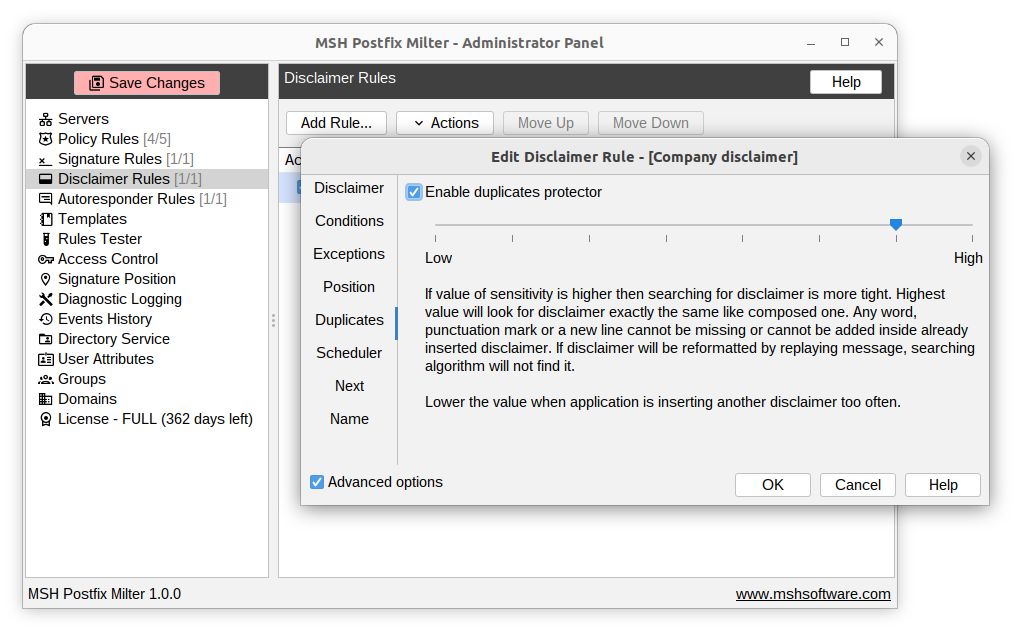
Configure it in four steps
- Install the milter and connect it to Postfix with
smtpd_milters- this covers all submission paths at once. - Write the disclaimer as text or HTML in the Administrator Panel.
- Scope the rule - for example outbound mail only - and choose where the disclaimer sits in the message.
- Test and enable with the built-in rules tester.
Frequently asked questions
How do I configure a disclaimer in Postfix?
Postfix cannot add disclaimers on its own. You add one with a content filter such as alterMIME, or with a milter. MSH Postfix Milter applies legal disclaimers to outgoing mail from a central panel, with HTML support and rules that decide exactly which messages get the text.
Can I add a disclaimer only to external or outgoing email?
Yes. With MSH Postfix Milter you scope a disclaimer rule by message direction, so internal mail stays clean and only outbound messages to external recipients receive the disclaimer.
Does the disclaimer support HTML formatting?
Yes. MSH Postfix Milter supports HTML disclaimers and keeps a plain-text alternative in sync. The classic alterMIME method only appends plain text reliably.
How do I stop the disclaimer from repeating on every reply?
MSH Postfix Milter has duplicate detection that prevents the disclaimer from being added again to a thread that already contains it.