Executable and script attachments are a classic malware vector, so blocking risky file types is a basic mail-server control. To make Postfix block attachments by name, type, or size you have two realistic options: the nativemime_header_checks mechanism, or a milter that inspects the message body.
The native route is regex-based, rejects the whole message, and is easy to get subtly wrong. This page walks through it honestly - including a working.exe rule and how to test it - covers where ClamAV and amavisd-new fit, and then shows how MSH Postfix Milter blocks or strips attachments with clear policy rules.
The native way: mime_header_checks
Postfix can inspect MIME headers and reject messages whose attachment names match a pattern. Enable it in main.cf:
mime_header_checks = regexp:/etc/postfix/mime_header_checks
Then add the patterns. This rule blocks the usual executable and script extensions, including .exe, .bat, and .scr:
/name=[^>]*\.(bat|com|exe|dll|vbs|js|jar|scr|pif)/
    REJECT For security reasons, this attachment type is not accepted.
Reload Postfix, then confirm the pattern does what you expect before trusting it:
postmap -q 'name="invoice.exe"' regexp:/etc/postfix/mime_header_checks
postfix reload
Note that mime_header_checks applies to MIME headers only. The relatedheader_checks and body_checks parameters cover different parts of the message, and mixing them up is a common source of rules that silently never fire.
This stops the obvious cases, but it has real shortcomings:
- Reject only. It bounces the whole message - you cannot strip the bad file and deliver the rest.
- Filename matching only. It keys off the declared name, so a renamed
.exe, or one inside a ZIP archive, slips straight through. - Collateral damage. Broad patterns block legitimate mail. A rule matching
.zipor.xmlwill also eat DMARC aggregate reports from Google and Microsoft. - No size logic. Blocking oversized attachments is a separate mechanism entirely.
- Regex maintenance. The rules are cryptic, unordered, and easy to break during an unrelated change.
- Coarse scope. Applying different policy to inbound vs outbound, or per department, is awkward at best.
Where ClamAV and amavisd-new fit
Many Postfix installations already run amavisd-new as a content filter with ClamAV behind it, and it is fair to ask whether that already covers attachments. It solves an adjacent but different problem.
A virus scanner answers "is this file known malware?" by matching it against a signature database. Attachment policy answers "is this file type allowed here at all?" Those come apart precisely where it matters: a brand-new executable with no signature yet passes ClamAV cleanly, while a type-based rule stops it regardless of whether anyone has seen it before.
Most sites want both - signature scanning to catch known viruses, and an attachment policy as the blunt instrument that does not depend on threat intelligence being up to date. Running amavisd-new purely to gain attachment filtering, though, means maintaining a whole content-filter stack for one feature.
Policy rules with MSH Postfix Milter
MSH Postfix Milter handles attachments with policy rules. You match attachments by name, type, or size, and choose whether to block the message or strip the attachment and deliver the rest - all from a readable rule editor.
Three ways to match, so regex stays optional
Attachment name and type conditions each support exact text, wildcards, and regular expressions. Everyday rules need nothing more than a wildcard, and the full regex engine is there when a rule genuinely calls for it - the difference frommime_header_checks is that regex is a choice rather than the only option:
- Exact - match one specific filename or MIME type.
- Wildcard -
*.exefor executables,text/*for any text format, or*.zip.exeto catch the double-extension trick. - Regular expression -
.*\.(exe|bat|cmd|scr)$when you want several extensions in a single rule.
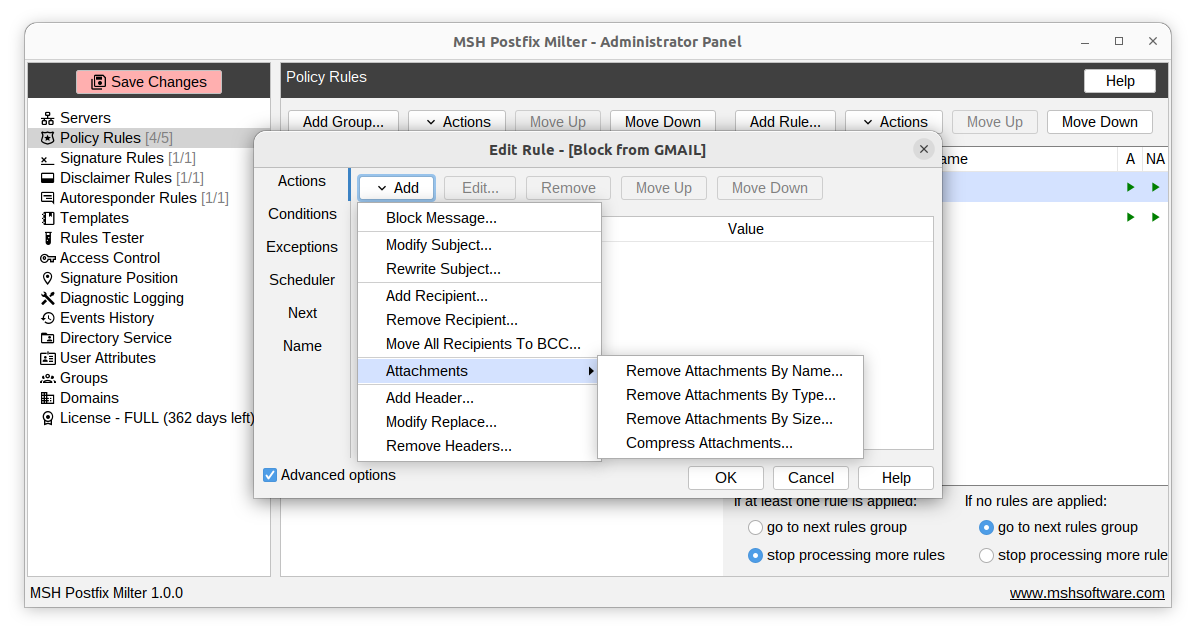
Set it up in four steps
- Install the milter and connect it to Postfix with
smtpd_milters. - Create a policy rule with an attachment condition for name, type, or size.
- Choose the action - block the whole message, or strip just the matching attachment and deliver the rest.
- Test and enable with the built-in rules tester.
Because rules can be scoped by direction and sender or recipient, you can quarantine dangerous inbound files while applying different limits to outbound mail. Stripping matters more than it sounds: rejecting a message because of one bad file means the sender has to work out what happened and resend, whereas stripping delivers the correspondence and drops only the attachment.
Which approach should you use?
| Requirement | mime_header_checks | MSH Postfix Milter |
|---|---|---|
| Block by extension | Regex only | Exact, wildcard, or regex |
| Match renamed or disguised files | No | Yes, by detected type |
| Block by attachment size | No | Yes |
| Strip instead of reject | No | Yes |
| Separate inbound and outbound policy | Awkward | Yes |
| Known-virus detection | No - use ClamAV | No - use ClamAV |
If you only need to reject a handful of executable extensions on a single small server, the native method is enough and costs nothing. Once you need stripping, size limits, per-direction policy, or rules that colleagues can read a year from now, hand-maintained mime_header_checks patterns stop scaling - not because regular expressions are the problem, but because they are the only tool Postfix gives you for the job.
Frequently asked questions
How do I block attachments by file extension in Postfix?
Postfix can reject some attachments with mime_header_checks regular expressions, but the rules are brittle and only reject the whole message. MSH Postfix Milter blocks attachments by name, type, or size with readable policy rules and can strip the attachment instead of rejecting the message.
How do I block .exe attachments in Postfix?
The native approach is a mime_header_checks regular expression matching name=*.exe and similar extensions such as .bat, .scr, .vbs, and .js. It works for plainly named files but misses renamed or archived executables. A policy rule that matches the detected attachment type catches cases a filename pattern cannot.
Can I strip an attachment instead of rejecting the whole email?
Yes. MSH Postfix Milter policy rules can strip or remove matching attachments and let the rest of the message through, so the recipient still gets the email without the blocked file. Plain Postfix mime_header_checks can only reject the entire message.
Do I still need ClamAV or amavisd-new?
They solve a different problem. ClamAV detects known malware signatures and amavisd-new orchestrates scanning, so they answer "is this file a known virus". Attachment policy answers "is this file type allowed here at all", which blocks brand-new threats a signature database has not seen yet. Most sites run both.
Can I block attachments only on incoming or only on outgoing mail?
Yes. Policy rules can be scoped by message direction and by sender or recipient, so you can block dangerous inbound attachments and control what leaves your organisation separately.
Does it catch disguised file types?
MSH Postfix Milter can match attachments by detected type and by size as well as by name, so it catches more than a simple filename extension match in mime_header_checks.