Out-of-office notices, acknowledgement emails, and automatic replies are everyday needs - but Postfix has no built-in autoresponder. As a mail transfer agent it delivers messages; generating an automatic reply is outside its job. Admins usually bolt on procmail, the vacation plugin, or a custom script.
This page walks through the traditional procmail/vacation approach and where it gets fragile, then shows how MSH Postfix Milter provides scheduled, loop-safe autoresponder rules from a central panel.
The manual way: procmail and vacation
A common DIY setup hands delivery to procmail and uses the vacationprogram for each mailbox. In main.cf:
mailbox_command = /usr/bin/procmail
Then a per-user .procmailrc triggers the vacation reply:
:0 Wh: vacation.lock
* !^FROM_DAEMON
* !^X-Loop: alice@example.com
| /usr/bin/vacation -a aliases alice
It works for a single user, but it does not scale or stay reliable:
- Per-mailbox files. Every user needs their own procmail and vacation configuration, edited on the server.
- Loop and bulk hazards. Without careful filtering, autoreplies bounce back and forth or reply to mailing lists and newsletters.
- No real scheduling. Turning the reply on for a date range and off again is manual.
- Hard to audit. There is no central place to see who has an autoresponder active.
- Plain and basic. Conditions such as "only reply to external senders" take extra scripting.
Autoresponder rules with MSH Postfix Milter
MSH Postfix Milter adds autoresponders as rules in the Administrator Panel. You set the reply subject and body, add conditions, and optionally schedule a date range - with loop protection handled for you.
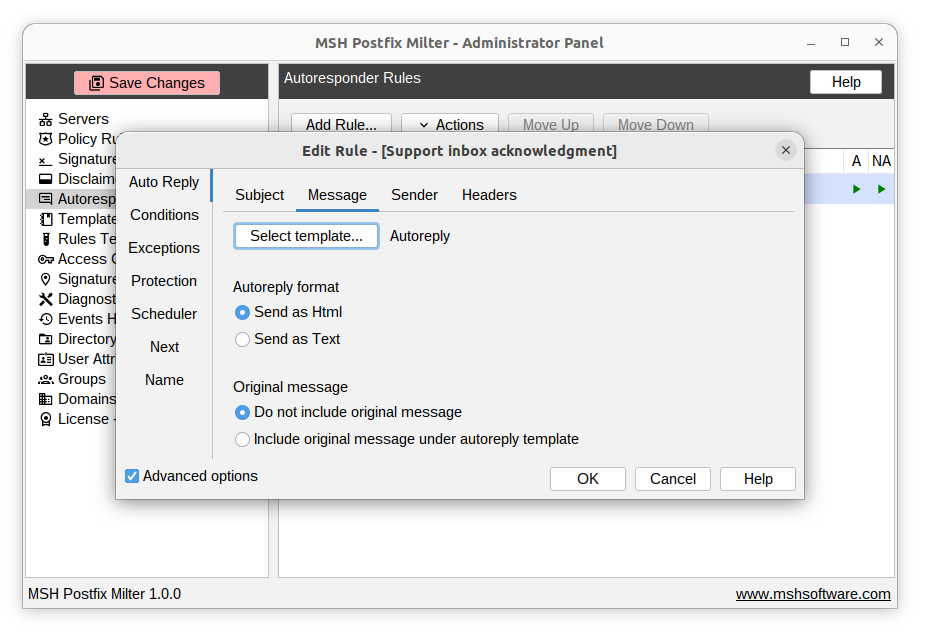
Set it up in four steps
- Install the milter and connect it to Postfix with
smtpd_milters. - Create an autoresponder rule with the reply subject and message body.
- Add conditions and a schedule - target the right senders or recipients and set optional start and end dates.
- Test and enable with the built-in rules tester.
Because rules are centralised, setting an out-of-office for one person or a whole team is a few clicks, and built-in protection keeps replies from looping or hitting mailing lists.
Frequently asked questions
Does Postfix have a built-in autoresponder?
No. Postfix has no native autoresponder. Auto-replies are usually added with procmail, the Postfix vacation plugin, or a custom script. MSH Postfix Milter provides server-side autoresponder rules from a central panel, with conditions and scheduling.
Can I schedule an out-of-office reply for a date range?
Yes. Autoresponder rules in MSH Postfix Milter include a scheduler, so you can set an out-of-office reply to run only between specific start and end dates.
How do I stop the autoresponder from replying to mailing lists or itself?
MSH Postfix Milter includes protection options and conditions that prevent reply loops and avoid auto-replying to bulk or list mail, which a basic procmail vacation script does not handle well.
Can I set up auto-replies centrally for many users?
Yes. Autoresponder rules are managed centrally in the Administrator Panel and can target individual users, groups, or domains, instead of editing a .procmailrc file per mailbox.