Modify subject
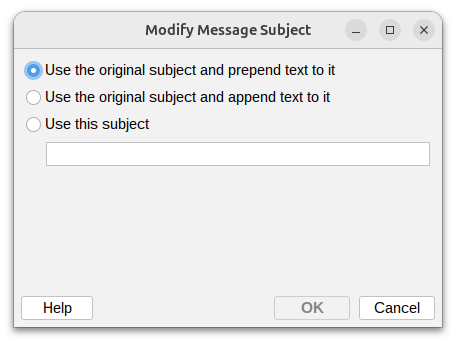
Use the original subject and prepend text to it
Best for: Adding warning tags, classifications, or urgency indicators at the beginning.
Example use cases
- Add
[EXTERNAL]to emails from outside your organization - Prepend
[URGENT]to high-priority messages - Add
[SPAM?]to suspicious emails that need review - Insert
[CONFIDENTIAL]to sensitive communications
| How the message subject will be affected | |
|---|---|
| Subject before change | Automatic order M223998 |
| Text to prepend | [EXTERNAL] |
| Subject after change | [EXTERNAL] Automatic order M223998 |
Use the original subject and append text to it
Best for: Adding disclaimers, routing info, or supplementary details at the end.
Example use cases:
- Append
- Scanned for virusesto confirm security checks - Add
(Auto-archived)to messages being archived - Include
- Contains large attachmentsas a warning - Append
[Processed by Security Gateway]for audit trails
| How the message subject will be affected | |
|---|---|
| Subject before change | Automatic order M223998 |
| Text to append | [SPAM] |
| Subject after change | Automatic order M223998 [SPAM] |
Use this subject
Best for: Completely replacing subjects for standardization or security reasons.
Example use cases:
- Replace subjects in automated reports with consistent naming
- Redact sensitive information leaked in subject lines
- Standardize notification subjects from various systems
- Override malicious or misleading subject lines in quarantined emails
| How the message subject will be affected | |
|---|---|
| Subject before change | Automatic order M223998 |
| Text to use | Subject modified by policy rules |
| Subject after change | Subject modified by policy rules |