Block message
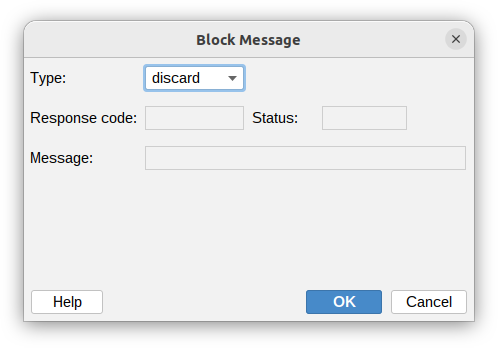
Block message action allows blocking email messages during SMTP transactions. When a milter decides to block a message, it returns specific response codes to control Postfix's behavior.
Below is a summary of key response codes for blocking messages, their descriptions, effects on the message, and example use cases.
| Field | Description |
|---|---|
| Type |
|
| RCODE | SMTP response code (e.g. 550 for reject, 450 for tempfail). Available with custom type. |
| XCODE | Enhanced status code (e.g. 5.7.1 for security reject, 4.7.1 for temp). Available with custom type. |
| Message | The text message returned to the SMTP client explaining why the email was blocked. Example: "Message rejected - Spam detected". Available with custom type. |
Block message types
Discard
Silently accepts and discards the message. Message is accepted (no SMTP error to client) but never delivered. No explicit Postfix log; treated as accepted.
Reject
Instructs Postfix to issue a permanent 5xx SMTP error, rejecting the message. The message is discarded; the client is told not to retry.
Postfix logs it as milter-reject.
Tempfail
Issues a temporary 4xx SMTP error, deferring the message. Client may retry later; Postfix queues if retries exceed limits.
Postfix logs it as milter-reject.
Custom
Common examples of custom block messages:
| RCODE | XCODE | Message | Use Case |
|---|---|---|---|
| 550 | 5.7.1 | "Message rejected: Sender not authorized" | Unauthorized sender domain |
| 554 | 5.6.0 | "Message rejected: Message size too large" | Oversized attachments |
| 451 | 4.7.1 | "Message deferred: Rate limit exceeded" | Too many messages from sender |
| 550 | 5.7.0 | "Message rejected: Policy violation detected" | Content policy violation |
| 421 | 4.3.0 | "Service temporarily unavailable, try later" | System maintenance or resource limits |
Best practices
- Use
discardsparingly to avoid confusing senders, - Use
rejectfor clear policy violations, - Use
tempfailfor transient issues, - Use
customfor uncertain cases.
Sources for custom codes
- Primary Standards:
- RFC 5321 (SMTP codes): https://tools.ietf.org/html/rfc5321
- RFC 3463 (Enhanced status codes): https://tools.ietf.org/html/rfc3463
- IANA: Comprehensive list at https://www.iana.org/assignments/smtp-enhanced-status-codes/smtp-enhanced-status-codes.xhtml
- Postfix Milter Docs: http://www.postfix.org/MILTER_README.html (examples of common codes).