Actions
Actions define what happens to an email message when a policy rule matches. Each action targets a specific aspect of the message - you can block delivery outright, rewrite the subject, manage recipients, manipulate attachments, or add and remove headers. Multiple actions can be combined within a single rule to apply several changes in one pass.
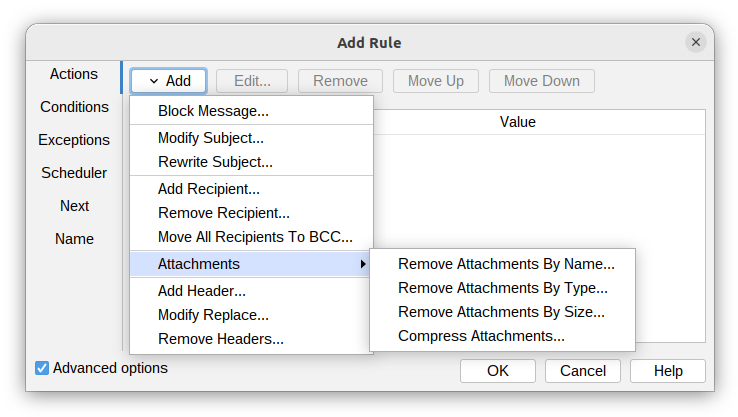
Block message
Block message action allows blocking email messages during SMTP transactions. When a milter decides to block a message, it returns specific response codes to control Postfix's behavior.
For more information, see Block Message.
Modify subject
Modify the message subject, use one of three available options to modify the subject.
For more information, see Modify subject.
Rewrite subject
Rewrite the message subject, use regular expressions to replace a part or whole message subject. This action gives more flexibility to change subject than Modify subject action.
For more information, see Rewrite subject.
Add recipient
Add a new recipient to the message.
For more information, see Add recipient.
Remove recipient
Remove a recipient from the message.
For more information, see Remove recipient.
Move all recipients to BCC
Move all recipients of an email message to the Bcc field.
For more information, see Move all recipients to BCC.
Remove attachments by name
Remove attachments from an email based on their names.
For more information, see Remove attachments by name.
Remove attachments by type
Remove attachments from an email based on their content type.
For more information, see Remove attachments by type.
Remove attachments by size
Remove attachments from an email based on their file size.
For more information, see Remove attachments by size.
Compress attachments
Compress attachments in an email message to reduce their total size.
For more information, see Compress attachments.
Add header
Add a custom header to an email message.
For more information, see Add header.
Modify header
Change the value of an existing email header in the message.
For more information, see Modify header.
Remove headers
Remove specified headers from the message.
For more information, see Remove headers.